
This is real CSS from a gea example app:
@keyframes cube-spin {
  0%   { transform: rotateX(-18deg) rotateY(24deg) rotateZ(0deg); }
  45%  { transform: rotateX(44deg)  rotateY(188deg) rotateZ(5deg); }
  100% { transform: rotateX(342deg) rotateY(384deg) rotateZ(0deg); }
}

.cube-app {
  background-image: linear-gradient(135deg, #12130f 0%, #171b14 45%, #251a15 100%);
  perspective: 155vh;
  perspective-origin: 50% 30%;
}
It spins a 3D cube — perspective projection, backface culling, translucent faces, and a grid floor drawn with repeating linear gradients — at 42 frames per second on an AMOLED display.
It runs on an ESP32-S3: a dual-core, 240 MHz microcontroller with 512 KB of internal SRAM that costs a few dollars.
This is the first post on the gea blog, so some context first. These boards are cheap and their displays are good, but the firmware they usually ship with does not make the most of them: a typical stock UI repaints the entire panel on every change and clocks it out over a slow link, so the screen visibly redraws from the top down. That isn't a UI; it's a progress bar pretending to be one. The bottleneck is rarely the chip. It is how the display is driven.
What gea is
gea is a framework for building apps for small devices — smartwatch-sized AMOLED screens, round rotary dials, 7-inch panels — the way you build them for the web. You write TSX components with reactive state, style them with plain CSS files, and the toolchain compiles the whole thing to native C++. The binary flashed to the chip holds your app's logic as machine code, plus a rendering pipeline closer in structure to a game engine than to a browser.
A modern browser engine is tens of millions of lines of code. gea's entire style and layout engine is about six thousand lines of C++. It stays that small by implementing a focused slice of CSS — chosen for broad impact, not for completeness. And that slice is compiled, not interpreted: don't interpret CSS, compile it.
What ships to the chip
There is no CSS file on the device, and no CSS parser in the render loop. At build time, geatsc —
gea's TypeScript-to-C++ compiler — and the gea plugin read your stylesheets and emit a registration
for every rule; at boot, each value is parsed once into typed storage. From then on a rule isn't text,
it's typed fields. The .cube-app gradient, for one, lands in the node's
ComputedStyle as:
// linear-gradient(135deg, #12130f 0%, #171b14 45%, #251a15 100%)
uint16_t bg_gradient_from_color;  // #12130f -> RGB565
uint16_t bg_gradient_mid_color;   // #171b14
uint16_t bg_gradient_to_color;    // #251a15
uint16_t bg_gradient_mid_stop;    // 450    (45%, permille)
uint16_t bg_gradient_to_stop;     // 1000   (100%)
int16_t  bg_gradient_angle;       // 1350   (135.0 deg, tenths)
uint8_t  bg_gradient_from_alpha;  // 255
Three colors packed to the panel's native RGB565, two stops in permille, one angle in tenths of a
degree — no linear-gradient(...) string on the device, and nothing to re-parse when a
frame is drawn.
That ComputedStyle is a fixed-layout struct of about 520 bytes — every supported property
pre-allocated as a typed field. Reading border-radius is a struct field read; setting
opacity writes a uint8_t. There is no per-property allocation, which matters
on a chip where the largest free block of internal SRAM at render time can be 8 KB.
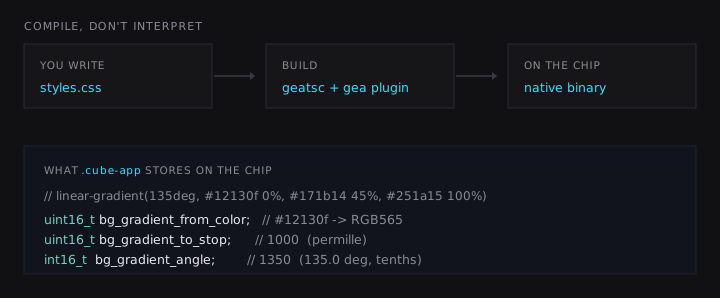
.cube-app to the chip: geatsc folds every CSS rule into the generated
program at build time, and each value is parsed once, at boot, into a typed field — no
stylesheet and no CSS parser ever ship to the device.
What the runtime supports
Handling color and width and calling it CSS support would be easy. The goal
was a subset large enough to build real interfaces — the CSS you actually reach for. Here is what the
runtime supports today:
-
Flexbox, implemented from scratch in about 1,300 lines: direction, wrap,
grow/shrink,
gap,justify-content,align-items, the lot. Plus a small grid mode (up to 8 tracks per axis), absolute/fixed positioning, andz-index. -
Selectors, matched at runtime against the live tree: classes, element names,
descendant and direct-child combinators,
::before/::after. Parsed selectors are cached so matching never re-tokenizes a string. -
Animations and transitions:
@keyframeswith delay, duration, iteration counts, direction, fill modes, and cubic-bézier easing. A small animation engine ticks once per frame and interpolates colors, angles, and scalars directly into the typed style fields. -
Transforms in 2D and 3D:
rotate/rotateX/Y/Z,translate,scale,transform-origin,perspective,perspective-origin,backface-visibility. This is what makes the cube a cube and not six flat divs. -
Custom properties:
var(--accent)with fallbacks, pluscalc(),min(),max(), andclamp(). Variables are dependency-tracked — when--accentchanges, only the nodes that reference it recompute, not the whole tree. -
Media queries, evaluated at runtime against the real panel:
min-width,orientation,aspect-ratio,resolution. On the web this is for resizable windows; here it lets one app target a 410×502 portrait AMOLED, a 480×480 round dial, and a 1280×800 panel without three stylesheets. -
The paint vocabulary you would expect: linear and radial gradients with multiple stops,
border-radiusper corner,box-shadow(including inset),opacity,filter: blur(),overflow,text-overflow: ellipsis,vw/vh/vmin/vmaxunits.
Text gets the same treatment: fonts are rasterized at build time into grayscale coverage atlases, so glyphs are anti-aliased on device without a TTF parser at runtime.
Rendering a frame
Supporting the properties is half the work. The other half is acting on them 42 times a second on a 240 MHz core.
The renderer is a retained display list. Layout runs once and records the tree into a flat command buffer: fill this rounded rect, blit this glyph run, fill this transformed quad with a gradient. On a state change, nothing is redrawn wholesale — the renderer tracks dirty regions (up to 32 coalesced rectangles) and replays only the commands that intersect them, in paint order.
A transform-only frame — what a @keyframes rotation produces — takes an even shorter path.
There is no need to re-record the display list: the renderer checks that every retained command is
re-projectable (about 14 microseconds), pushes the existing corner points through the new transform
matrix, and re-sorts them by depth. For the cube, that is roughly 2.7 ms instead of a full
layout-and-record pass; the display list survives, only its geometry moves.
Then the pixels have to leave the chip. The framebuffer — 410×502 at 16 bits per pixel, 411 KB — does not fit in the ESP32-S3's 512 KB of internal SRAM alongside everything else, so it lives in external PSRAM. A DMA engine streams dirty rows from PSRAM into the QSPI peripheral in 32–64-row chunks, two in flight at a time, while the CPU works on the next frame. The link runs at 80 MHz quad-SPI, about 40 MB/s — enough for a full-screen flush in ~10 ms, a ceiling of roughly 52 fps if every frame is a full redraw.
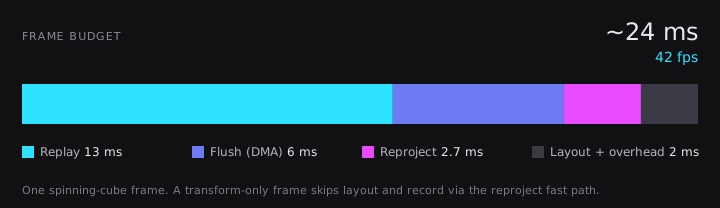
A frame of the spinning cube breaks down like this on device:
| Phase | Time |
|---|---|
| Replay (rasterize the translucent faces) | ~13 ms |
| Flush (DMA to the panel) | ~6 ms |
| Reproject (transform fast path) | ~2.7 ms |
| Layout, dirty tracking, overhead | ~2 ms |
That is about 24 ms, or 42 fps, with alpha-blended faces compositing over a gradient backdrop.
The bottleneck is memory, not compute
The bottleneck looked like it would be arithmetic — the per-pixel blending and 3D math — so the usual fixes went in first: SIMD blend loops processing eight pixels per op, sine/cosine lookup tables, and rasterization split across both cores.
The two-core split helped. The SIMD blend came in within measurement noise of the scalar loop; the arithmetic was not the constraint.
The renderer is memory-bound, not compute-bound. Every framebuffer write and every node read crosses the bus to external PSRAM, and that bandwidth — shared between the CPU, the cache, and the DMA engine feeding the display — is the actual frame-rate ceiling. Once that was clear, the optimizations that mattered were the ones that move fewer bytes: dirty rectangles, the reproject path, backdrop caches that let opaque backgrounds skip re-rasterization, and a line-break cache so scrolling text never re-measures glyphs.
Meeting the hardware
A compiled app still has to meet the board underneath it. The renderer ends at a display backend that
hands finished, dirty rows to whatever bus the panel speaks — quad-SPI here, RGB on another board.
Input comes back the other way: a small platform layer reads the touch controller and delivers a
stream of Down/Move/Up events with coordinates, into the same
path the app's handlers already see in the browser simulator. Synthetic events take the same path, so
a recorded drag in a test behaves exactly like a real finger.
No app code names a board. Which AMOLED, which touch part, which bus, and the vendor SDK beneath them all stay behind that platform layer. That boundary is what lets the same compiled app run on the watch, a round dial, a 7-inch panel, the simulator, and macOS: the hardware changes underneath, the app does not.
Constraints
gea is not a browser. There is no :hover, because these are touch screens. The UI tree is
capped at 512 nodes, grid stops at 8 tracks per axis, and animations interpolate colors, angles, and
scalars rather than arbitrary properties. On a watch-sized screen, none of these limits have been a
problem in practice. Within them, the supported CSS behaves as the spec describes: the semantics are
intact, and only the runtime interpreter is gone.
The trade-off
Embedded UI usually comes down to one of two approaches: hand-positioning widgets from C structs, or shipping a full web runtime — often on a Linux-class board — to draw something as simple as a thermostat. The web's authoring model (components, classes, the cascade, keyframes) is a good way to describe a UI; its runtime cost is what has kept it off small hardware.
Compiling that model removes the runtime cost. You write CSS; the chip runs machine code.
This is the first post in a series. Next: what happens when the same app meets a screen it was never
written for — a full-color panel one day, a monochrome e-paper display with no touch the next — and why
one @media (monochrome) block and a keydown handler are all it takes to follow along.